
Macro testing and failures
Once the macros have been constructed, they need to be invoked via one of the invocation methods.
During the macro construction process, you can test the macro to ensure it works as expected.
Depending on the macro functionality, the system or application will need to be in a state ready to receive the playback or the macro needs to cater as best as possible to prepare the system to receive the playback.
A tried and tested macro should run 100% of the time as expected, but there is always a possibility this is not the case and should a playback fail in a way that can be detected by the playback mechanism then an error message will be issued, allowing the user to jump to the failure point in the macro:
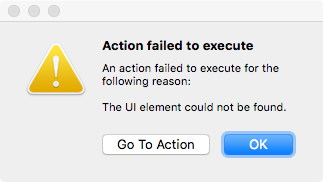
In the above case, an action has been performed on a UI element that has not been found at the time the action was executed.
Selecting the 'Go to Action' option will highlight the failing action within the Macro Editor.
This particular error could indicate the UI element just does not exist in the application, or more likely was not present in time for the action to be performed.
For example, a heavily loaded system might run slower such that the macro playback timings are affected and need adjusting
Share Article
Last updated