
Software
This page covers software download, installation, running, modes of operation and updates
A 30 day, fully functional trial version is available here for macOS version 10.10 and above.
The trial period allows for the creation and editing of menus and macros utilised with in Project files.
Unless a licence key is applied during the trial period, the creation features are disabled and Flexi-deck switches to playback mode only, allowing for the execution of preexisting standard projects.
Trial versions of the software will only run on systems connected to the internet
Some versions of Touch-Base's UPDD touch screen driver will also pre-install the Flexi-deck software.
macOS
The Flexi-deck software is delivered as an Apple Disk Image file (.dmg), named Flexi-deck-n.n.n.zip, with n.n.n representing the version number.
Once downloaded, the installation should start automatically and show the disk image on the desktop and the Flexi-deck installation dialog.
To install, simply drag the Flexi-deck application to the Applications folder.


Once invoked from the Application folder, Flexi-deck will run as a background process and show the Flexi-deck menu bar icon 
The menu bar icon can be disabled in the Flexi-deck preferences if required.
A preference setting can also be set to load Flexi-deck at user login.
Modes of operation
The software can run in Creator or Player mode.
Creator
Following installation on an on-line system, the software runs in Creator mode and offers full functionality for 30 days, allowing you to create and run Flexi-deck standard projects.
During the 30-day trial period, you will be prompted each time Flexi-deck starts to either continue with the 30-day Creator trial or order the full production version via our registration process. You can also opt to switch to the free Player mode during the trial period.

To continue in creator mode beyond the 30 day trial period, a licence needs to be purchased and applied. If no licence is applied during the trial period, you can opt to enter Player mode.
Player
The free Player mode prevents the ability to create or modify projects, but will run any standard projects created during the trial period, or downloaded from other sources.
Software updated are performed automatically if you are connected to the internet and the 'Check for updates automatically' is enabled in Preferences. You can also 'Check for Updates' at any time from the File Menu.
If you have purchased a licence from the Flexi-deck web site you can always download the latest software from your personal download page during your software warranty period.
The automatic update option will advise if a new version is available, as per this example:
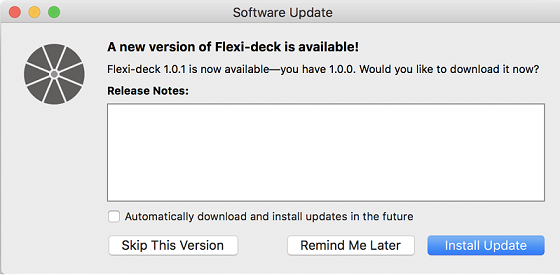
As part of the update procedure, existing project files are backed up, as it's possible that project files will be automatically converted as part of the update to be compatible with the new version.
If a project file is upgraded a backup file will be created, and it will named by adding a timestamp using this scheme: [name of your project]_YYYY-MM-DD.fdproj
If there is already a file with that name, it will try appending a _1, _2, etc. until the name is unique
If, for any reason, you need to return to a previous version of the Flexi-deck application you can always revert to previous versions from your personal download page or the development history page.
A licence is required...
To run the software in Creator mode at the end of the 30-day trial
To enable the Player to process premium libraries
To licence a Premium, professional created, library
To license the Creator, Player or a Premium project, you need to enter the relevant licence key into the software.
Creator
During the 30-day trial period, you will be prompted each time Flexi-deck starts to either continue with the 30-day Creator trial or order and apply a licence for the full production or switch to the free Player mode.
A creator licence is required to create and maintain Flexi-deck standard projects.
If no licence is applied by the end of the trial period you will be asked how you wish to proceed; order a licence online, or switch to 'free' Player mode to be able to run standard projects.
You can also purchase a Creator licence from the Flexi-deck web site.
Player
Licence the player to run premium libraries.
A Player license can be purchased on the above form or from the Flexi-deck web site.
Premium
Premium (specialist professional library) projects, that have been created for specific application interaction, need a project licence and a licensed version of Flexi-deck to run the project.
When you download and open a Premium project within Flexi-deck you will be prompted to enter a library licence. These can be purchased from the Flexi-deck web site.
Creator online
Player online
Register online
Register offline
Change history is available from Flexi-deck Menu Bar, as replicated below:
1.18.0
Added a setting for choosing whether the mouse cursor will be reset to its original location after a macro has finished executing Added a setting for adjusting the size of menu button icons Added a setting to click actions for specifying the duration of the click Added a setting for for having a menu automatically close when another menu closes Added option to have macro execution continue if an action fails Message box actions now allow continuing the macro while the message box is open Can now import multiple macros simultaneously by shift or command clicking the files in the import dialog Project info now allows pasting in rich text Checking a box to enable a menu or button color now assigns it the current default color rather than the last used color Unused menu buttons are no longer saved to disk Clicking outside of a keystroke line edit will unfocus it Updated Logic Pro key commands for Logic Pro 11.2 Recent projects menu now uses shortest unique paths instead of full paths No longer showing disconnected UPDD devices in the Menu Editor Removed erroneous "Ignore" menu item In macOS 15 and later, a prompt asking for local network permission will only appear when using the "Logic Pro Key Command" action Added command line arguments for closing all menus in a project, closing all menus, and toggling various editor windows Fixed icon for macOS 26 Fixed crash that could occur when an application has no open windows Fixed crash that could occur when opening a project that has project information set to open automatically Fixed bug in keystroke editor where option to record by key position didn't work Fixed bug where menus would briefly switch into move mode erroneously when clicking on one of their buttons Fixed bug where bottom-aligned text in rectangular menus would order wrapped lines in reverse order Fixed bug where keystrokes involving the arrow, navigation or function keys wouldn't be able to trigger system-wide keyboard shortcuts Fixed bug where the Macro or Menu editor window could open behind the other editor windows Fixed bug where the "Position" button in the Menu Editor wouldn't work if a menu was set to only be visible with another menu Fixed bug where an imported nested macro could have macros with invalid paths if the macro was renamed during import to avoid a naming collision Fixed bug where exporting a macro could fail due to an erroneous "infinite recursion" error Fixed bug where renaming a menu would break "Menu can only open when the above menu is open" or "Close menu when the above menu closes" when the selected menu is the one being renamed Fixed bug where display names would be missing in macOS 15 and later Mostly fixed am issue where, due to a bug in macOS 15 and later, executing the "Pick menu item" action for a menu item that's in partially closed menu would cause the UI for the menu's application to totally lock up. (It's still possible to trigger this, but significantly less likely to happen now.) Fixed colors on search text fields in the Macro Editor Fixed dark mode colors in the Hotkey Editor, and Desktop Icon editor, and text fields for choosing applications Fixed "QCommandLineParser: already having an option named" warnings when using command line interface Using new Touch-Base license server
18 Nov 24
1.17.1
Updated Logic Pro key commands action for Logic Pro 11.1
3 June 24
1.17.0
Added "Send OSC Message" action Updated Logic Pro key commands action for Logic Pro 11 Can now zoom the menu preview in the menu editor in and out Added a right click menu to the buttons that allow choosing images for menu icons, backgrounds, desktop icons, and message box icons, with an option to select images and paste images from the clipboard and embed them directly in the project Added a "Copy Special" menu to the menu editor's Edit menu for copying buttons, their icons, their colors, and their backgrounds Added right-click menu for copying and pasting menu buttons, their icons, their colors, and their backgrounds in the menu editor Added close button to project info window Added "Close Project" menu item to the menu bar icon and main menus for more easily closing any open project Changed "Active Project" to "Focused Project" for greater clarity Popup buttons for choosing a display now include the display's name Fixed "selected track" macros in Pro Tools 2024.3.1 Fixed bug where setting a menu's "pressed" background and undoing might reset it to the wrong image Fixed bug where the cut / copy / paste menu items in the menu bar would change order Fixed bug where "Click" pop-up button displayed incorrectly in dark mode Fixed bug where the licensing dialog displayed incorrectly in dark mode Fixed bug where the OK button in error dialogs that appeared over top of the licensing dialog would not be clickable Menus and menu previews are now visible to macOS Accessibility features Added a hidden setting "menuFadeMS" for changing the menu fade time1.17.1
12 June 23
1.16.0
Can now drag and drop images on to the buttons that allow choosing icons or backgrounds Rectangular menu buttons now have a setting for the vertical alignment of their labels Holding Shift+Option and dragging on a rectangular menu now resizes it proportionally. Holding Shift+Option+Control resizes it freely. Updated the available Logic Pro Key Commands to match Logic Pro 10.7.8 Fixed bug where clicks were not passing through transparent portions of menus Fixed bug where opening the menu editor could cause a menu to revert back to its original size and position Fixed bug where child menus could go out of alignment with their parent menus when the parent menu is being resized Fixed bug where menus would display incorrectly when being moved between retina and non-retina displays Fixed bug where menu button numbers would be elided Fixed bug where "No icon" item in the icon browser would be misaligned
5 April 2023
1.15.0
Now runs natively on Apple Silicon Supports dark mode Added two new built-in macros for Pro Tools, used to select the next empty insert or send slot of the currently selected track Fixed a bug where message box icons wouldn't display at the correct resolution on retina monitors Fixed a bug that could cause Flexi-deck to associate a UPDD device with the wrong monitor Fixed crash that occurred when closing the documentation window while a text field is focused
10 Feb 2023
1.14.0
Now supports using SVGs for icons and backgrounds images in menus and actions Fixed memory leak when leaving the smart magnifier open for long periods of time
18 Nov 2022
1.13.0
Added "Logic Pro Key Command" action Added a setting for repeating nested macros a set number of times Improved loading times of large projects Improved saving so that it is slightly faster and less likely to cause file corruption in case a disk I/O error occurs Fixed bug where a keystroke action could trigger a macro hot key, leading to broken macros or infinitely repeating macros Fixed bug where some Pro Tools UI elements would not be found reliably Fixed bug where menus might not appear over full screen applications
12 July 2022
1.12.0
Added a setting to desktop icons that allows hiding their background image Added a setting for menu buttons that open or toggle a menu allowing them to remain highlighted so long as that menu is open Dropping a macro on to the menu preview in the Menu Editor will assign it to whichever type of click is currently selected in the righthand side of the editor Added the "Run shortcut" action (macOS 12 Monterey and above) Activate / quit / toggle application actions can now specify an app by bundle ID. Fixed execute shell command for upddutils / now uses correct environment variables Fixed a bug where some line edits wouldn't undo to the correct text
26 April 2022
1.11.1
Fixed exporting projects with embedded images Warning the user when exporting a menu, button, or macro by itself and it contains embedded images Fixed bug where exporting a menu or button could silently fail rather than displaying a useful error message
10 March 2022
1.11.0
Added a button action for closing all of the current project's menus Added an option to Open / Close Menus action that allows closing all of a project's open menus, or all menus across all projects Added a setting for turning off tapering of a menu's dividing lines as they approach the edge of the menu Menus that are positioned relative to another menu will move when their target menu is moved Magnifier is smoother and uses less CPU Magnifier actions will coordinate with UPDD Commander if it's installed and make use of its Smart Magnifier feature Improved rendering and fixed subtle errors in the positioning of background images in rectangular menus Can now specify whether bundle ID or process name should be used when searching for a UI element, and both attributes can have multiple values Exporting a project with embedded images will only include one copy of each embedded image, resulting in smaller file sizes When duplicating a menu, the default suggested name will now increment a number at the end of the menu's name if there is one Fixed bug where sometimes a menu preview would be rendered too dark in the Menu Editor Fixed crash that could occur when performing pinch / expand gestures over a menu window Fixed crash when holding option and reordering hotkeys in the Hotkey Editor Fixed crash that could occur when menus that are positioned relative to another menu form an infinitely recursive chain of relative menus
23 Nov 2021
1.10.0
Added "Set Clipboard" action Fixed toggling the Accessibility Keyboard in macOS 12
22 Oct 2021
1.9.1
No longer causing a macro to fail when an open/close menu action tries to close menus in a project that is not open Checking to make sure licence keys are for the correct product before registering them Added menu items for licencing to the menu bar icon menu Fixed bug where the app could open in Player mode after clicking the "Start Demo" button Fixed "subdirectory not found" error message that could appear in the log
22 Sept 2021
1.9.0
Can now specify multiple values for attributes in the UI Element Editor when using custom matching When specifying multiple values for attributes, Flexi-deck can automatically find translations of the selected value Renamed some UI element attribute names to something more simple and understandable Message box actions now use native macOS dialogs and can have customised icons Message box actions can now include a button for not showing the message box again Removed message box action width setting as it is no longer necessary and does not work in macOS Big Sur Project info windows can to be set to open when the project opens Added a log window Can now pick UPDD devices for a menu's display if the UPDD is installed In macOS 10.15 or later, Flexi-deck will warn if it does not have Screen Recording permissions when using the magnifier actions App and document icons now match the look of macOS Big Sur Fixed some minor rendering issues Fixed bug where changes to a menu's divider color couldn't be undone Fixed bug where the horizontal scroll bar in the UI Element Editor attribute table would always be visible Fixed bug where adding a UI element in the UI Element Editor would not deactivate the buttons for highlighting the current matching UI element Fixed bug where some tables would automatically scroll at inappropriate times Fixed bug where licencing dialog would disappear when invoking Mission Control Fixed bug where offline registration would report that the license was valid but the app was not registered Fixed tab order and tool tips in the application preferences window Fixed bug where it was possible to create a hot key in Player mode but not edit or delete it Fixed bug where a warning dialog could appear after selecting a menu item Fixed bug where the Dock icon would unnecessarily hide when the app starts up when it is set to always be visible Fixed bug where the Macro Editor window would disappear when switching the frontmost app while selecting a UI element in the UI Element Editor Fixed crash that could occur when registering the app while the UPDD is installed
21 July 2021
1.8.2
Fixed bug where menus positioned relative to another menu could appear on the wrong display after moving the target menu Updated app icon to match Big Sur style
19 July 2021
1.8.1
Fixed repositioning menus that are positioned relative to another menu Instructional text when repositioning menu mentions that escape key will leave repositioning mode Fixed bug where a menu assigned to a non-existent display would fail to open Fixed bug where exporting a project would not warn if an image file was missing when using "embed custom icons and background" option
25 June 2021
1.8.0
Replaced "Last position" option for menus and desktop icons with check box that's available when set to "Position on display" Last remembered location for menus and desktop icons is now in normalized coordinates on a specific display, so that changing a display's resolution or arrangement won't cause the menu to appear in the wrong location It's now possible to edit menu position, invocation, and behaviour settings and which hotkeys are enabled in premium projects Added licenced Player mode for opening standard projects created on other systems Free Player mode can no longer open standard projects created on other systems In the desktop icon editor, changed "icon" label to "image" to improve clarity Fixed bug where the user could be asked to upgrade premium projects Fixed bug where menu appearance settings were not centered horizontally Fixed bug where menus could remain open after closing their project Fixed crash that could occur when open a dialog without an editor window open
31 May 2021
1.7.0
Added "Toggle application" action Built-in background images now includes the Flexi-deck logo in several colours Changed "Open File" action to "Open File / Folder" and its file browser now allows selecting a folder Can now press and hold on any menu button that closes the current menu to move the menu window Menu windows now darken as an additional visual indicator that they are being moved Menu bar icon's menu now shows Flexi-deck's mode of operation The menu editor will open the first time the application is launched Fixed bug where error message for quit application would display %1 instead of an application name Fixed bug where menus that are shown due to an application launching or becoming active are in persistent mode Fixed UI bug where the position fields and "Position" button in the menu position settings would not always be enabled when "Relative to another menu" is selected Fixed the "Position" button in the desktop icon editor dialog Fixed bug where desktop icons that are positioned relative to their menu were not repositioning themselves when their menu moves Fixed bug where dialog boxes that appear after selecting a UI element would be blank No longer warning about null UI elements when selecting menu items
21 May 2021
1.6.1
Added new command line arguments for displaying a JSON formatted list of menus and macros in the currently open projects Added "New Project" menu item to menu bar icon's menu A menu button's action can now be set to "Close current menu & open menu" Menu buttons with a background image that fills the whole button but no pressed background image now has visual feedback indicating that it is pressed Added "Close all projects" menu item Added "Close all menus" menu item Added logging for licensing No longer showing the unknown system warning for premium projects After creating a new macro or folder in the macro library, its name is automatically in edit mode Fixed command line argument for showing, hiding and toggling menus Fixed bug where menus may remain able to be shown even after their project had closed Fixed a memory leak when executing certain macros Fixed bug where menu buttons with no action would not close a menu when it is set to close after clicking a button Fixed a bug where Flexi-deck may not have focus after opening a project from its menu bar icon Fixed rare crash that can occur when executing a macro Numerous improvements and fixes to text across the UI Many minor "under the hood" improvements
15 April 2021
1.6.0
Desktop icons can now include an icon displayed over the Flexi-deck logo Desktop icons can now execute a macro before showing their corresponding menu "Send command to UI element" now includes a timeout option Minor UI improvements
17 Mar 2021
1.5.0
One "free" premium projects can be open at a time without a licence Fixed a bug where desktop icons could appear at the wrong size and on the wrong display after booting up Fixed bug where fixed width fonts would not be fixed width in macOS 10.15 Fixed a bug where Flexi-deck would report a premium project as not registered after entering its licence key Fixed minor UI bugs in the licencing dialog
4 Mar 2021
1.4.4
Fixed a bug where the macro library could keep scrolling to the left by a few pixels Fixed a bug where errors that occur while exporting a project wouldn't prevent it from saving to disk Fixed a bug where not all global macros would be embedded in a project while exporting it Improved the wording of the warning dialog when exporting global macros without embedding them
1 Mar 2021
1.4.3
Fixed a crash that would occur when selecting a degenerate UI element or running a macro that interacts with one Fixed a bug where desktop icons could be moved to the wrong monitor when configuring them Desktop icons can no longer be dragged off screen or underneath of the menu bar
25 Feb 2021
1.4.2
Desktop icons can now be partially transparent Desktop icon's position can now be set to "Last location" similar to menus Menus that would appear more than 80% off screen will be moved full on screen before they open Added additional rounded rectangle backgrounds for rectangular menu buttons Hotkey Editor is available in Player Mode and allows disabling individual hotkeys Macro Editor now warns when removing macros that are in use by a menu button Fixed a bug where the editor windows could be moved underneath of the menu bar Fixed a bug where Flexi-deck would fail to find UI elements for apps that have multiple running instances Flexi-deck can now licence and open premium projects Several "under the hood" improvements and fixes
17 Feb 2021
1.4.1
Changed default desktop icon colour to grey Improved automatic calculation of desktop icon label font size Improved layout of desktop icon editor dialog No longer allowing desktop icons to be positioned in the same place as its menu if the menu is set to appear under the mouse cursor Reseting a desktop icon's offset when changing its position on a display Fixed bug and crash where desktop icons wouldn't close with their project or when deleting a menu Fixed error in desktop icon rendering Fixed bug where a desktop icon would get stuck on screen after closing the editor dialog without making changes Fixed bug where opacity slider may not be available in the color palette window
16 Feb 2021
1.4.0
Added "desktop icons" to menus, an always-on-top icon that can be used for opening and closing its menu Added three new buttons backgrounds, including a green rounded button that was missing in 1.3.0 Can import menus, buttons and macros by opening their icons in the Finder Rectangular menus can now have full size icons with no label Increased the timeout when searching for UI elements during macro execution (Fix for Schelps 73 EQ plugin) Increased default length of pause action from 100 to 250 ms Improved handling of exporting a project and dealing with name conflicts Improved error and warning text during exports Removed defunct "on screen keyboard" when running in macOS 11 or later Fixed bug where small circular menus buttons might not display their text Fixed bug where the colour picker would not close when the return or enter key is pressed Fixed bug where Flexi-deck documents were not properly associated with the app Fixed bug where some overlay text would render with the wrong font size
29 Jan 2021
1.3.0
Using new licence server and revamped the licencing dialog that appears at startup Font size of labels in menus now scale with the menu Labels in circular menus now automatically fill the entire region occupied by the button Removed 'widen' setting Improved performance when rendering menus Fixed a bug where exporting a project may not embed images if they were linked with a relative path Added background images to rectangular menus Fixed a bug where non-square icons would be rendered out of aspect ratio in rectangular menus Fixed a bug where built-in Pro Tools would not work if any auxiliary windows were open, such as Transport
30 Dec 2020
1.2.9
Fixed a bug introduced in 1.2.8 that would cause Flexi-deck to fail to find degenerate UI elements in situations where it worked previously
23 Dec 2020
1.2.8
Fixed a crash that could happen when interacting with UI elements Fixed a bug where the unsaved changes dialog may not stop the system from logging out, restarting, or shutting down when all the editor windows were closed Fixed a bug where canceling the unsaved changes dialog while the system is logging out would not cancel logging out Removed option to have Flexi-deck's Dock icon always be invisible as it caused too many issues in regards to ensuring documents would be saved while the system is logging out
10 Dec 2020
1.2.7
The "Open / Close Menu" action can now interact with menus from other projects Will now display a warning when opening a project created by a newer version of Flexi-deck Fixed bug in the "Selected track" Pro Tools built-in macros where they would interact with the wrong track after reordering the tracks in Pro Tools Nested macros can now override the "if action fails" setting on the actions they contain Added new Pro Tools macros for clicking the VCA group selector and playlist selector of the selected track Fixed existing Pro Tools macros that would not consistently work across different types of tracks or in the Mix window Rectangular menus can now be resized using two finger pinch / expand trackpad gestures Radial menus no longer blink as they are resized Various under-the-hood bug fixes
12 Nov 2020
1.2.6
Added additional built-in macros for clicking elements of the selected track in Pro Tools
21 Oct 2020
1.2.5
Improved project save and load times Hiding unneeded UI when the app is in player mode
9 Oct 2020
1.2.4
Added a new action for triggering MIDI events Added some info text to the Pro Tools built-in macros
29 Sept 2020
1.2.3
Added feature where menus positioned relative to other menus can be resized proportionally to their target menus Fixed bug where menus wouldn't open in player mode Improved visual look and consistency of message boxes Fixed some built-in macros
28 Sept 2020
1.2.2
Added "Player-only" mode for unlicensed copies Fixed a bug where the licensing window was inaccessible in demo mode when opening it via the menu bar Minor under-the-hood bug fixes
18 Sept 2020
1.2.1
Improved detection and discovery of pop-up menu UI elements in Pro Tools Added built-in actions for clicking the various send and insert buttons of the selected track in Pro Tools Upgrading projects now includes the option to make a backup of the project before upgrading After upgrading a project, it is saved automatically Converted many dialog boxes to sheets and made their appearance more consistent Fixed exporting macros containing nested macros No longer displaying "invalid UI element" for a UI element that hasn't been assigned yet Click actions no longer fail with an "invalid UI element" error if the UI element is off screen
10 Sept 2020
1.2.0
Added options for text size to menus and menu buttons Added an option for the color of the division lines between menu buttons Added a feature where Flexi-deck will try to discover translations of UI element text so that macros continue to work with different languages Added a feature for specifying menu positions as relative to another menu Option key is now only used for moving menus. Menus can be resized by holding option and shift. Changed text of the menu behaviour buttons to improve clarity Changed app icon so that it appears more clearly on a dark background Fixed crash in wait for UI element action Fixed scrolling issues in the library browser of the Macro Editor Showing warning when an invalid UI element is selected Fixed detection of UI elements in Pro Tools Flexi-deck can now find menu items in the pop-up menus in Pro Tools
3 June 2020
1.1.2
Fixed a bug where custom menu icons weren't referenced using a relative path when in the same folder as the project Added an option for embedding custom menu icons when exporting a project Fixed a bug where the macro editor could open when updating the app
27 May 2020
1.1.1
Fixed bug that could prevent projects from opening when its menu names contained a slash Fixed crash that could occur at launch if a project contains a menu that invokes with an application, and that application is already running Renaming a macro will update any associated hot keys Increased the maximum rows and columns for a rectangular menu to 50 Improved the selection of default important attributes when using custom UI element matching so that a UI element is more likely to be successfully matched across different systems Warning dialogs for projects from unknown sources now contain the name of the project
1 Feb 2020
1.1.0
Initial production release
Last updated